Stream Deck Integration
What Is Stream Deck Integration?
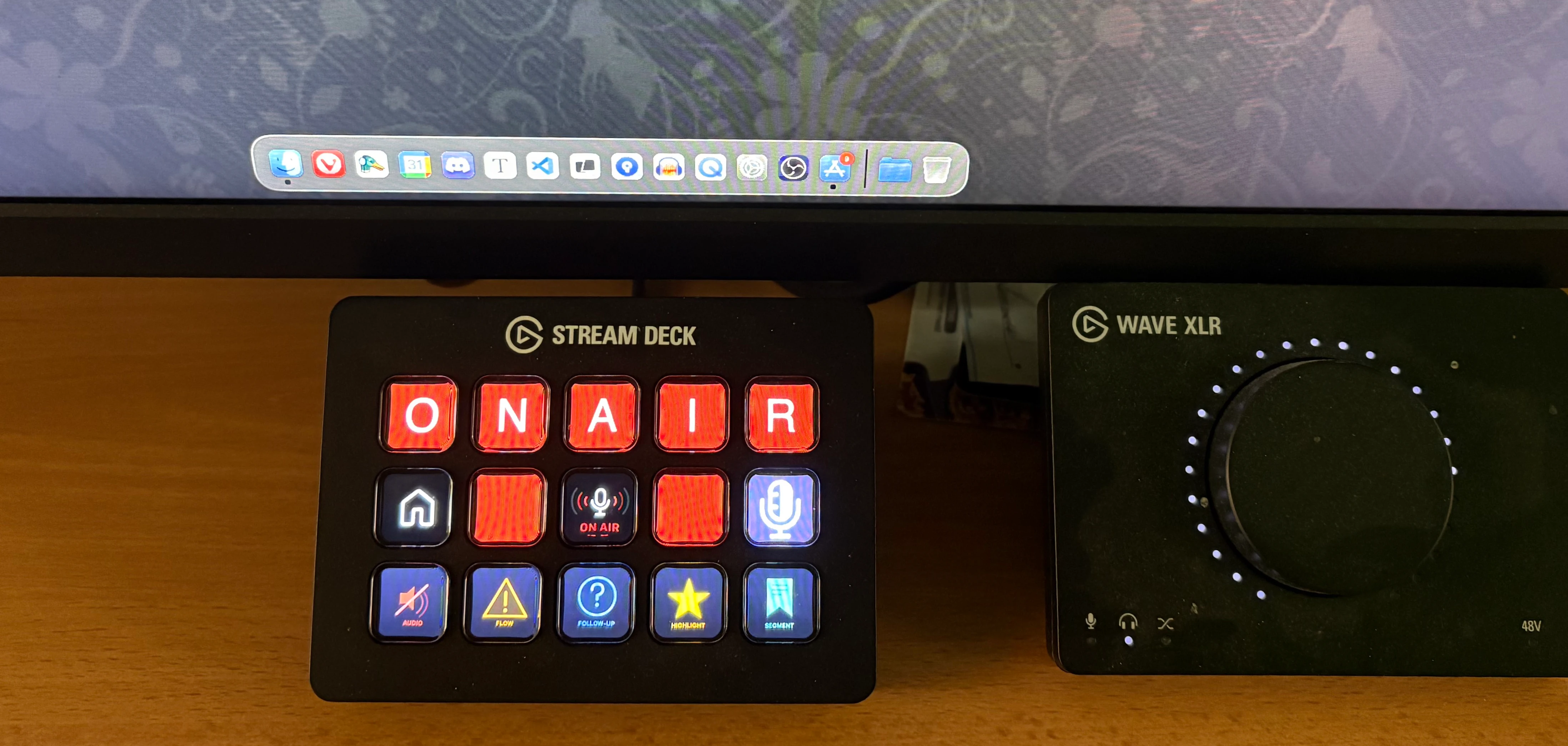
InterviewCue's Stream Deck integration lets you trigger interview events from physical buttons on your Elgato Stream Deck (or any tool that can make HTTP GET requests). Press a button to mark a highlight, flag an audio issue, or note a follow-up question -- without touching your keyboard or mouse.
Events automatically target your most recently started in-progress interview, so you set up the buttons once and they work for every interview.
Quick Start
- Create an API key at Account > API Keys
- Copy a Stream Deck URL for the event type you want (e.g., Highlight)
- In the Stream Deck app, add a Website action to a button
- Paste the URL into the URL field
- Enable "GET request in background" (this prevents a browser window from opening)
- Start an interview and press the button!
That's it. The event will appear on your current question's timeline instantly.
Available Events
| Event | What It Does | Icon |
|---|---|---|
| Highlight | Mark a great moment worth revisiting | Star |
| Flow Interrupt | Flag when conversation flow was disrupted | Warning |
| Follow-Up | Note something to come back to later | Question |
| Audio Issue | Flag audio problems for post-production | Mute |
| Segment | Mark a segment boundary | Bookmark |
These are the same event types available in the live interview toolbar.
How It Works
Automatic Interview Targeting
When you press a Stream Deck button, InterviewCue automatically finds the right interview:
- Targets your most recently started in-progress interview
- Interviews older than 8 hours are ignored (abandoned interview guard)
- Works in both solo mode and collaborative mode
- Events appear on the current question's timeline
You don't need to configure which interview to target -- it just works.
Solo Mode vs. Collaborative Mode
- Solo mode: Events are added directly to the interview. You'll see them when you review the post-production timeline.
- Collaborative mode: Events are added to the interview AND connected WebSocket clients see the new event immediately.
API Reference
For advanced users or non-Stream-Deck integrations, here are the raw API endpoints.
List Available Events (No Auth)
GET /api/streamdeck/events
Returns:
{
    "events": [
        {"slug": "highlight", "name": "Highlight", "icon": "fa-star"},
        {"slug": "flow-interruption", "name": "Flow Interrupt", "icon": "fa-exclamation-triangle"},
        {"slug": "follow-up", "name": "Follow-Up", "icon": "fa-question-circle"},
        {"slug": "audio-issue", "name": "Audio Issue", "icon": "fa-volume-mute"},
        {"slug": "segment", "name": "Segment", "icon": "fa-bookmark"}
    ]
}
Check Active Interview Status
GET /api/streamdeck/status?api_key=YOUR_KEY
Returns:
{
    "active": true,
    "interview": "Episode 42 with Guido van Rossum",
    "started_ago": "12 minutes",
    "questions": 8,
    "current_question": 3
}
Trigger an Event
GET /api/streamdeck/<event-slug>?api_key=YOUR_KEY
Example: GET /api/streamdeck/highlight?api_key=YOUR_KEY
Success response:
{
    "success": true,
    "event": "content_highlight",
    "event_name": "Highlight",
    "interview": "Episode 42 with Guido van Rossum",
    "question_index": 3,
    "time_in_seconds": 847
}
Error response (no active interview):
{
    "success": false,
    "error": "No active interview found",
    "detail": "Start an interview first, then press the Stream Deck button."
}
Troubleshooting
"No active interview found"
You need to start an interview before pressing Stream Deck buttons. Begin your interview (click "Start Recording" or "Begin Questions"), then press the button.
Key not working
Check that your API key hasn't been revoked. Go to Account > API Keys to verify. If it's been revoked, create a new key and update your Stream Deck buttons.
Events not appearing in collaborative mode
If you're in collaborative mode and events from Stream Deck don't appear for other participants, check their WebSocket connection. The Stream Deck API updates the session state version, which connected clients poll for.
Multiple in-progress interviews
If you have multiple interviews started, Stream Deck targets the most recently started one. End interviews you're done with to avoid confusion.
Security Best Practices
- Revoke keys you're not using -- old keys are a liability
- Create separate keys for separate devices -- if one is compromised, revoke just that key
- Keys only grant event-trigger access -- they cannot read your interviews, change your password, or access your account settings
- API keys are scoped -- they work only for Stream Deck event endpoints, not the full API