Preparing Interview Questions
Questions Are Your Interview's Backbone
Every interview in InterviewCue is built around questions and background notes. Questions are what you see and follow during the conversation -- clear, concise prompts that keep you on track. Background notes are your supporting information -- context, pronunciation guides, follow-up reminders, talking points -- visible only to you during the interview (and optionally your co-host or guest if you invite them via the shared live view feature).
Together, they serve three purposes:
- Guide you during the conversation -- so you stay on track without reading from a script
- Capture timing for post-production -- every time you advance to the next question, InterviewCue records the timestamp
- Become chapters in your final audio -- those timestamps translate directly into chapter markers for your published episode
Getting your questions and notes right is the single most impactful thing you can do before hitting record.
Where Questions Come From
The Collaborative Approach (Recommended)
The best interviews start as a conversation before the conversation. As detailed in Your First Interview, the recommended workflow is:
- Write your outline in Google Docs, Notion, or a similar collaborative tool
- Share it with your guest so they can add context, correct details, and feel more prepared
- Export as markdown and import into InterviewCue
In your outline, each H2 heading becomes a question, and the text beneath it becomes the background notes for that question.
This approach works because your guest sees simple, clean questions in the shared doc while you have the full context underneath. They collaborate on the conversation topics without seeing your private research notes -- those come along for the ride when you import into InterviewCue.
Any links embedded in your background text are automatically extracted and associated with the relevant question, so your reference materials are organized right where you need them.
See Creating and Managing Interviews for the full import workflow.
Building Questions in the Editor
If you're creating an interview directly in InterviewCue or refining one after import, the editor gives you full control:
- Add Question to create new questions on the fly
- Markdown formatting in both question text and background information -- bold, italic, lists, links, and more
- Drag-and-drop reordering via the handle on each question card
- Collapse/expand individual questions or all at once to manage your view
- Remove questions you no longer need
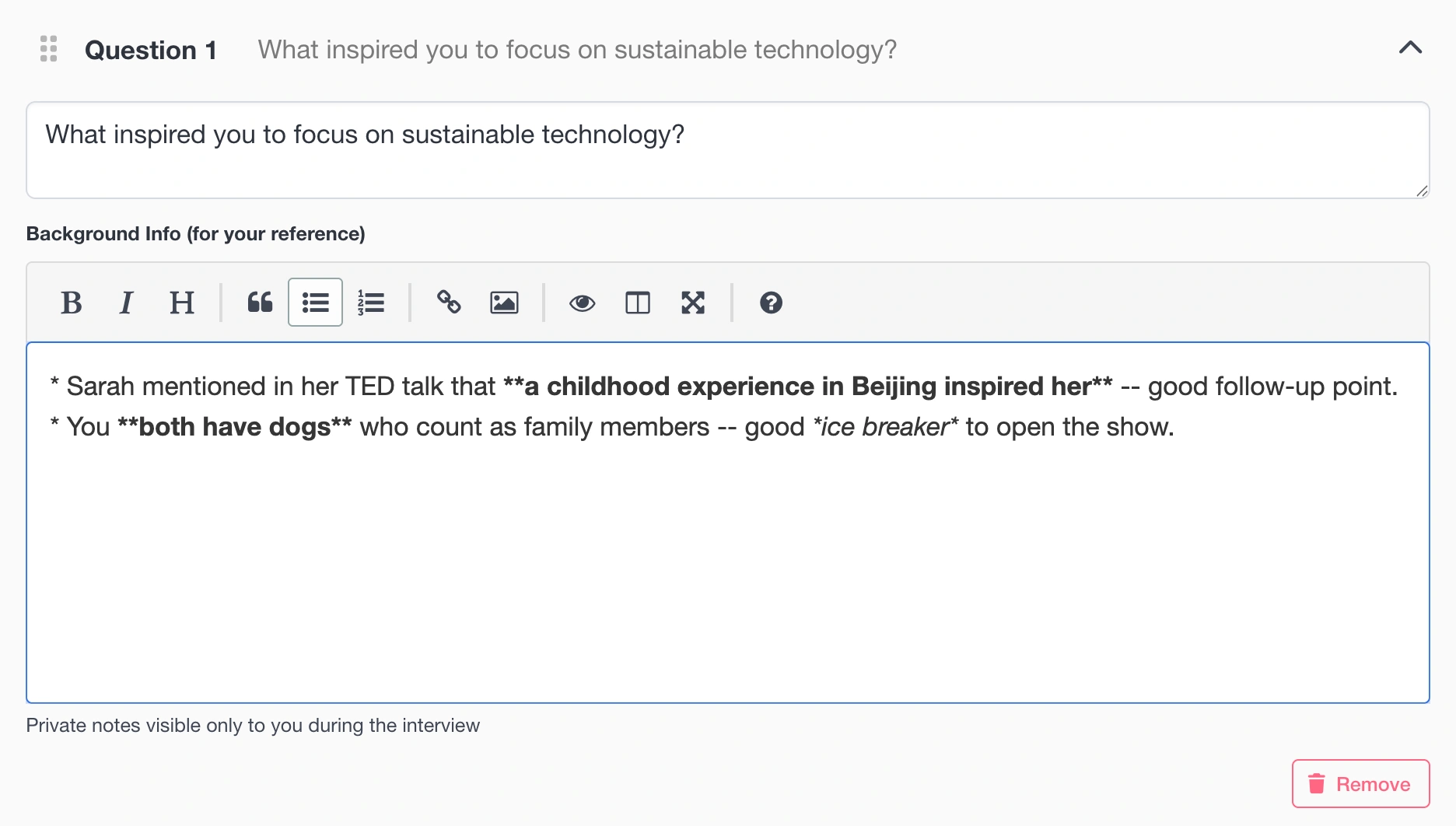
Each question keeps a stable identifier that links stay associated with, so reordering or editing questions won't break your reference link associations.
Important: Editing is available only before you start the interview. Once recording begins, questions are locked so that event timing stays consistent throughout the session.
Background Notes: Your Secret Weapon
Background notes are private information visible only to you during the interview -- unless you're in Collaborative Mode, where all participants (co-hosts and guests) can see them too. They appear below each question in a muted, smaller font -- there when you need them, invisible to your guest in the audience.
What to Include
📝 Research Points
"She mentioned in her 2024 blog post that this idea came from a trip to Japan"
🗣️ Pronunciation Guides
"Pronounce: Hyper-eeco, not Hyper-echo"
🔄 Follow-Up Reminders
"If she mentions the acquisition, ask about the transition period"
🔗 Context and Cross-References
"This connects to the team building question later -- don't go too deep here"
🏆 Talking Points
"Her product won Best Innovation Award 2024 -- good to mention"
⚠️ Sensitive Topic Flags
"The layoffs were public but she hasn't spoken about them -- approach carefully"
Best Practices
- Be concise -- you'll read these mid-interview while maintaining eye contact
- Use bullet points or short lines -- easier to scan at a glance than dense paragraphs
- Include pronunciation for names, companies, and technical terms -- nothing derails rapport faster than mispronouncing your guest's name or company
- Add links to specific resources in your notes -- they'll be extracted and available in your reference links section
- Flag sensitive areas -- remind yourself what to approach carefully
- Don't script it -- background notes should inform, not become a teleprompter
How They Appear During the Interview
In Live Mode, your questions appear as clear headlines with background notes beneath them in a smaller, muted font. The current question is highlighted with a "you are here" indicator so you always know where you are. You can glance down for context, scan a pronunciation, or check a follow-up reminder -- without losing your place in the conversation.
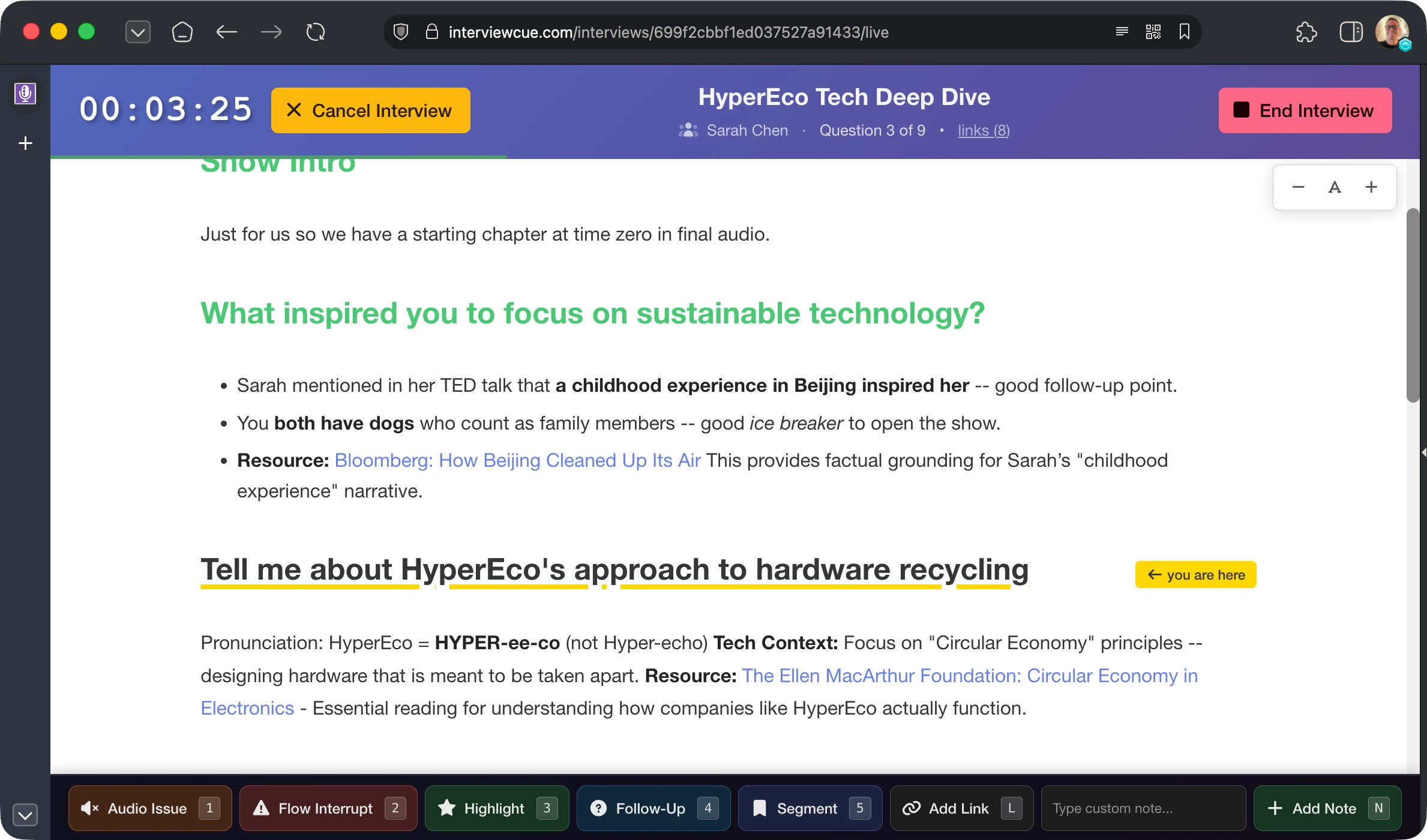
If you're working with a guest in Collaborative Mode, they see the background notes too -- helping them stay sharp and on point with the details you've gathered.
Structuring Your Interview
The Classic Arc
Most successful interviews follow a natural progression:
- Warm-up (first 1-2 questions) -- ease in with comfortable, broad questions that let your guest settle in and find their voice
- Background and context -- establish the story and set the stage for the main topics
- Main exploration -- the heart of the interview where you dive deep into the core topics
- Specific deep dives -- technical details, challenging questions, or nuanced points
- Wrap-up -- forward-looking questions, advice for the audience, inspiring close
This isn't rigid -- great interviews wander. But having this shape in your question order means the conversation has natural momentum even when you skip around.
How Many Questions?
There's no perfect number, but here are practical guidelines:
- 15-20 minute interview -- 3-5 questions
- 30-45 minutes -- 5-8 questions
- 60 minutes -- 8-12 questions
- 90+ minutes -- 10-15 questions
Quality over quantity. Five great questions that spark deep conversation will always produce better content than twenty questions you rush through. Leave room for follow-ups and unexpected directions -- the best moments in interviews are usually unscripted.
Remember: You're not locked into your question order during the interview. Live Mode lets you skip questions, jump to any topic, or revisit earlier points as the conversation flows naturally.
Crafting Great Questions
Open-Ended Beats Yes/No
Questions that invite stories and detail will always produce richer content:
- ✅ "What was it like when you realized this could actually work?"
- ✅ "Can you walk me through how that decision happened?"
- ✅ "Tell me about the moment things changed"
Versus questions that dead-end the conversation:
- ❌ "Did you enjoy that?" → ✅ "What did you enjoy most about that?"
- ❌ "Was it hard?" → ✅ "What was the hardest part?"
- ❌ "Do you recommend it?" → ✅ "What would you tell someone considering this?"
Mix Specific and General
General questions open doors:
- "What got you into this field?"
- "Tell me about your background"
Specific questions go deep:
- "You mentioned the 2019 pivot -- what triggered that decision?"
- "Your blog post about scaling challenges was fascinating -- why were the database issues hardest?"
The best interviews alternate between the two. A general question opens a topic, then a specific follow-up shows you've done your homework and pushes the conversation somewhere interesting.
Follow-Up Strategy
You don't need to script every follow-up -- let the conversation flow. But you can plant reminders in your background notes:
Question: "Tell me about your biggest challenge building the company"
Background Note: "Follow-ups: How did you overcome it? Would you do anything differently? What did the team learn?"
This gives you options without making the interview feel scripted. If the conversation naturally covers one of your planned follow-ups, skip it and move on.
Key Tips
Do:
- Ask "Why" -- it gets to motivations and meaning
- Ask for stories -- "Tell me about a time when..."
- Show you've done research -- reference their specific work
- Leave room for tangents -- the best content is often unplanned
- Ask what they're excited about -- enthusiasm is contagious
- Front-load your strongest questions -- energy drops over time
Don't:
- Ask what Google can answer -- make it worth their time
- Ask double-barreled questions -- one question at a time
- Lead the witness -- let them bring their perspective
- Script the entire conversation -- questions should guide, not constrain
Putting It All Together
Here's what a well-prepared interview looks like in the markdown import format -- questions as H2 headings with concise background notes beneath (export from Docs or Notion creates this hierarchy automatically):
# Clean Tech Innovation with Sarah Chen

## Tell me about yourself and how you got into sustainable tech

Stanford CS, worked at Google 2015-2018. Started HyperEco in 2019.
She's spoken about the "aha moment" in her TED talk.

## What problem were you trying to solve when you started HyperEco?

Product focuses on sustainable packaging for e-commerce.
Context: mention [Postman](https://postman.com) as analogy for dev tools space.

## Walk me through the early days -- idea to first customer

Raised seed round in 2020. First customer was Stripe.
Follow-up: What surprised you most about those first conversations?

## What's the biggest technical challenge you've faced?

She wrote a [blog post about scaling issues](https://example.com/scaling) -- good follow-up.
Their system processes 2M packages/month now.

## How has company culture evolved as you've grown?

Now 45 employees, fully remote since founding.
Pronounce: "Hyper-ee-co" not "Hyper echo" (one word).

## What's next for HyperEco?

Just announced Series A -- might hint at upcoming plans.
Don't press too hard if she can't share details yet.

## What advice would you give someone starting a sustainable tech company?

She mentors at Y Combinator -- might have good stories.
Great closing question -- let her inspire the audience.
Notice how each question is conversational and open-ended, while the background notes contain the research, follow-up reminders, and pronunciation guides you need. After import, all of this is organized and ready for your interview.
What's Next?
Now that your questions are ready, explore the rest of the preparation and recording workflow:
Reference Links - Add URLs for quick access during interviews
Live Interview Mode - See how questions appear during recording and how to navigate them
Post-Production Timeline - How captured question timing becomes chapters and edit points
Your First Interview - Walk through the complete journey from idea to published episode